Valid AZ-800 Dumps shared by PassLeader for Helping Passing AZ-800 Exam! PassLeader now offer the newest AZ-800 VCE dumps and AZ-800 PDF dumps, the PassLeader AZ-800 exam questions have been updated and ANSWERS have been corrected, get the newest PassLeader AZ-800 dumps with VCE and PDF here: https://www.passleader.com/az-800.html (321 Q&As Dumps)
BTW, DOWNLOAD part of PassLeader AZ-800 dumps from Cloud Storage: https://drive.google.com/drive/folders/1M49n7YTUDLf9THbqgk-Azy64eaC-kuhK
NEW QUESTION 291
Your network contains an Active Directory Domains Services (AD DS) domain named contoso.com. You implement a central store. You create a new Group Policy Object (GPO) named GPO1. When you attempt to edit GPO1, you see the settings shown in the exhibit: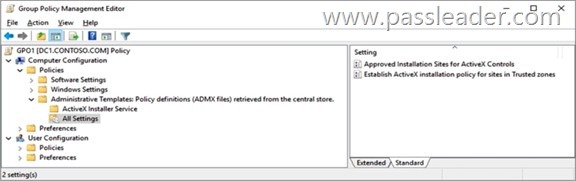
You need to ensure that all settings are available.
Solution: You modify the properties of GPO1.
Does this meet the goal?
A. Yes
B. No
Answer: B
NEW QUESTION 292
Which of the following schedulers provide a fair share and preemptive round-robin scheduling approach for guest virtual processors in Windows Server 2016 Hyper-V?
A. Classic Scheduler.
B. Core Scheduler.
C. Root Scheduler.
D. None of these.
Answer: A
Explanation:
The classic scheduler is the default for all versions of the Windows Hyper-V hypervisor since its commencement that also includes Windows Server 2016 Hyper-V. This scheduler provides a fair share and preemptive round-robin scheduling approach for guest virtual processors.
https://docs.microsoft.com/en-us/windows-server/virtualization/hyper-v/manage/manage-hyper-v-scheduler-types
NEW QUESTION 293
Your network contains an Active Directory Domain Services (AD DS) domain. The domain contains servers that run Windows Server and computers that run Windows. You link a Group Policy Object (GPO) to the domain and set Turn on BranchCache to Enabled. You need to enable BranchCache in BranchCache Distributed Cache mode. What should you configure on the computers?
A. Background Intelligent Transfer Service (BITS).
B. Offline Files.
C. Advanced sharing settings.
D. Windows Firewall inbound traffic rules.
Answer: D
Explanation:
You can create a Group Policy Object for all of the computers in your organization, configure domain member client computers with distributed cache mode or hosted cache mode, and then configure Windows Firewall with Advanced Security to allow BranchCache traffic.
https://learn.microsoft.com/en-us/windows-server/networking/branchcache/deploy/use-group-policy-to-configure-domain-member-client-computers
NEW QUESTION 294
You have a server named Server1 that runs Windows Server 2019 and hosts a container named Container1. Container1 uses a Windows Server 2019 base image that was built by using a Docker file. You upgrade Server1 to Windows Server 2022. You need to ensure that Container1 will run on Server1. The solution must minimize administrative effort. What should you do?
A. Start Container1 in Hyper-V isolation mode.
B. Modify the Docker file.
C. Start Container1 in process isolation mode.
D. Rebuild the base image for Container1.
Answer: A
Explanation:
When you upgrade Server1 to Windows Server 2022, you are running a newer version of the operating system than the one that the container (which is based on a Windows Server 2019 image) was built for. Containers running in process isolation mode must use a base image that matches the host OS version or be very close. Since the base image for Container1 is built on Windows Server 2019 and the host is now Windows Server 2022, process isolation would not work without rebuilding the image. To minimize administrative effort, you can run the container in Hyper-V isolation mode, which provides compatibility by allowing containers to run with a different kernel version than the host. Hyper-V isolation creates a lightweight virtual machine for each container, allowing it to run in its own isolated environment.
NEW QUESTION 295
Your on-premises network contains an Active Directory Domain Services (AD DS) domain. The domain contains a server named Server1 that runs Windows Server. You have an Azure subscription that is linked to a Microsoft Entra tenant. You need to add an Azure network adapter to Server1. Which type of credential should you provide for the adapter?
A. FIDO2 key.
B. Active Directory user account.
C. Microsoft Entra user account.
D. Certificate.
Answer: D
Explanation:
Azure uses certificates to authenticate clients connecting to a virtual network over a Point-to-Site VPN connection. The public key information of the root certificate is uploaded to Azure. The root certificate is then considered “trusted” by Azure for a Point-to-Site connection to the virtual network. Client certificates must be generated from the trusted root certificate and installed on the client server. The client certificate is used to authenticate the client when it initiates a connection to the virtual network.
https://learn.microsoft.com/en-us/windows-server/manage/windows-admin-center/azure/use-azure-network-adapter
NEW QUESTION 296
You have an on-premises server named DNS1 that runs Windows Server and has the DNS Server role. You have an Azure subscription that contains an Azure Private DNS zone named contoso.com. You implement an Azure DNS Private Resolver named Resolver1. You need to ensure that DNS1 can resolve names from contoso.com by using Resolver1. The solution must minimize administrative effort. What should you configure?
A. DNS policy
B. a Site-to-Site (S2S) VPN connection
C. root hints
D. a secondary DNS zone
Answer: D
Explanation:
https://learn.microsoft.com/en-us/azure/dns/private-resolver-hybrid-dns
NEW QUESTION 297
You have an on-premises server that runs Windows Server and contains the folders shown in the following table: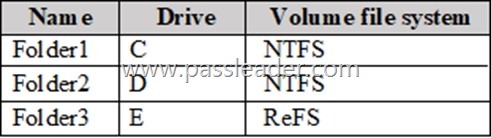
You have an Azure subscription. You plan to implement Azure File Sync. Which folders can be added as Azure File Sync server endpoints?
A. Folder1 and Folder2 only.
B. Folder1, Folder2, and Folder3.
C. Folder1 only.
D. Folder2 and Folder3 only.
E. Folder3 only.
F. Folder2 only.
Answer: A
Explanation:
A server endpoint can be created only on an NTFS volume. ReFS, FAT, FAT32, and other file systems aren’t currently supported by Azure File Sync. A server endpoint can’t be nested. It can coexist on the same volume in parallel with another endpoint.
https://learn.microsoft.com/en-us/azure/storage/file-sync/file-sync-release-notes
NEW QUESTION 298
You have an on-premises server named Server1 that runs Windows Server 2022 and is a container host. You have an Azure subscription. You plan to develop custom container images. You need to recommend a storage solution for the containers. The solution must meet the following requirements:
– Support the use of Docker commands.
– Minimize administrative effort.
What should you include in the recommendation?
A. Azure Container Instances
B. Azure Kubernetes Service (AKS)
C. Azure Container Registry
D. Azure Files
Answer: C
Explanation:
You can deploy a custom-configured Windows image from Visual Studio to make OS changes that your app needs. This makes it easy to migrate an on-premises app that requires a custom OS and software configuration. Azure Container Registry can store your images for container deployments. You can configure App Service to use images that are hosted in Azure Container Registry.
https://learn.microsoft.com/en-us/azure/app-service/tutorial-custom-container
NEW QUESTION 299
Your network contains an Active Directory Domain Services (AD DS) domain. The domain contains a server named Server1 that runs Windows Server 2022. You need to manage Storage Quality of Service (QoS) from Server1. Which Remote Server Administration Tools (RSAT) feature should you install?
A. RSAT: Failover Clustering Tools
B. RSAT: File Services Tools
C. RSAT: Storage Replica Module for Windows PowerShell
D. RSAT: Data Center Bridging LLDP Tools
Answer: A
Explanation:
Storage Quality of Service (QoS) in Windows Server 2016 provides a way to centrally monitor and manage storage performance for virtual machines using Hyper-V and the Scale-Out File Server roles. You can manage Storage QoS policies and monitor flows from compute hosts using the Remote Server Administration Tools. These are available as optional features on all Windows Server 2016 installations, and can be downloaded separately for Windows 10 at the Microsoft Download Center website. The RSAT-Clustering optional feature includes the Windows PowerShell module for remote management of *Failover Clustering*, including Storage QoS.
https://learn.microsoft.com/en-us/windows-server/storage/storage-qos/storage-qos-overview
NEW QUESTION 300
Your network contains an Active Directory Domain Services (AD DS) domain. The domain contains the servers shown in the following table:
You need to ensure that from Server1, you can use Windows Admin Center to manage the DHCP Server role on Server2. What should you do first?
A. Install the DHCP Server Tools feature on Server1.
B. Install a Windows Admin Center extension.
C. Install the DHCP Server Tools feature on Server2.
D. Modify the PowerShell remoting settings for Server2.
Answer: B
Explanation:
To manage the DHCP Server role on a separate server within the same AD DS domain using Windows Admin Center, you need to install the DHCP Server feature on the target server and ensure it is authorized in AD DS. Additionally, you need to install the DHCP module for Windows Admin Center and connect to the target server from within the Windows Admin Center interface. In essence, you’re leveraging the power of Windows Admin Center to manage a remote DHCP server within your AD DS domain by extending its functionality with the DHCP module and connecting to the target server.
https://learn.microsoft.com/en-us/windows-server/manage/windows-admin-center/configure/using-extensions
NEW QUESTION 301
You have an Azure subscription. The subscription contains a virtual machine named VM1 that runs Windows Server and has the following disks:
1. OS disk: Disk1
– Size: 512 GiB
– Free space: 260 GiB
– Encryption: SSE with PMK
– Storage type: Standard SSD
2. Data disk: Disk2
– Size: 512 GiB
– Free space: 45 GiB
– Storage type: Standard HDD
– Encryption: Platform-managed key
You are planning a maintenance strategy for VM1. You need to identify which task can be performed on Disk2 without causing downtime to VM1. What should you do on Disk2?
A. Increase the size.
B. Change the encryption type.
C. Decrease the size.
D. Change the storage type to Premium SSD.
Answer: A
Explanation:
https://learn.microsoft.com/en-us/azure/virtual-machines/disks-convert-types
NEW QUESTION 302
You have a Hyper-V host. You are evaluating the available schedulers. Which type of scheduler maximizes isolation between guests and the host?
A. classic
B. root
C. core
D. classic with Simultaneous Multithreading (SMT) disabled
Answer: C
Explanation:
The core scheduler offers a strong security boundary for guest workload isolation. It also reduces performance variability for workloads inside VMs that run on an SMT-enabled virtualization host.
https://learn.microsoft.com/en-us/windows-server/virtualization/hyper-v/manage/manage-hyper-v-scheduler-types
NEW QUESTION 303
You have three on-premises servers named SVR1, SVR2, and SVR3 that run Windows Server. SRV1 has a direct-attached storage (DAS) array. You plan to deploy a failover cluster named Cluster1 by using SVR2 and SVR3. You need to ensure that the DAS array on SRV1 can be used as shared storage for Cluster1. The solution must ensure that Cluster1 has block-level access to the storage. What should you do first on SRV1?
A. Run the start-service -name msiscsi cmdlet.
B. Install the iSCSI Target Server role service.
C. Install the File Server role service.
D. Run the Enable-ClusterStorageSpacesDirect cmdlet.
Answer: D
Explanation:
To utilize a DAS array as shared storage for a Windows failover cluster with block-level access, you can leverage Storage Spaces Direct (S2D) or configure the DAS as a Cluster Shared Volume (CSV). S2D creates a software-defined storage pool from the DAS drives, enabling highly available virtual disks. Alternatively, you can add the DAS as a CSV, making it accessible by all cluster nodes.
https://learn.microsoft.com/en-us/windows-server/storage/storage-spaces/deploy-storage-spaces-direct
NEW QUESTION 304
Your network contains an Active Directory Domains Services (AD DS) forest named adatum.com. Adatum.com contains the users shown in the following table:
You deploy a workgroup server named RODC1 that runs Windows Server. RODC1 contains a user named User4 that is a member of the local Administrators group. You pre-create a read-only domain controller (RODC) account named RODC1 in east.adatum.com and delegate RODC installation and administration permissions to User3. You sign-in to RODC1 as User4. Which credentials can be used to promote RODC1 to a RODC in east.adatum.com?
A. User3 only.
B. User3 and User1 only.
C. User3 and User2 only.
D. User1, User2, and User3.
Answer: C
Explanation:
https://learn.microsoft.com/en-us/windows-server/identity/ad-ds/deploy/ad-ds-installation-and-removal-wizard-page-descriptions
NEW QUESTION 305
Your network contains an Active Directory Domain Services (AD DS) domain. The domain contains two domain controllers named DC1 and DC2. DC2 runs on a Hyper-V virtual machine. You plan to deploy a new domain controller by cloning DC2. You need to create the CustomDCCloneAllowList.xml and the DCCloneConfig.xml files for DC2. In which folder should you save the files?
A. C:\Windows
B. C:\Windows\Setup
C. C:\
D. C:\Windows\NTDS
Answer: D
Explanation:
Place both the CustomDCCloneAllowList.xml and DCCloneConfig.xml files in the directory where the Active Directory database (ntds.dit) is located, which is typically C:\Windows\NTDS on the source domain controller. Alternatively, both files can be placed on the root of a removable media drive.
https://learn.microsoft.com/en-us/windows-server/identity/ad-ds/get-started/virtual-dc/virtualized-domain-controller-deployment-and-configuration
NEW QUESTION 306
Your network contains an Active Directory Domain Services (AD DS) forest named contoso.com. The forest contains the users shown in following table: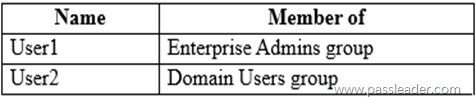
You have a workgroup server named Server1 that runs Windows Server and contains the local users shown in the following table: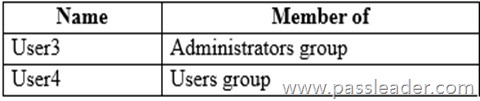
You promote Server1 to the first domain controller in a new child domain named east.contoso.com. Which users can sign in to Server1 locally?
A. User1 only.
B. User3 only.
C. User1 and User2 only.
D. User1 and User3 only.
E. User3 and User4 only.
F. User1, User2, User3 and User4.
Answer: A
Explanation:
* User1 – Yes
Enterprise admins in a forest can sign in locally on a new child domain’s first domain controller by default, because the Enterprise Admins group is automatically a member of the Administrators group in every domain within the forest.
* User2 – No
A regular domain user cannot log in locally to the first domain controller of a child domain by default, but it is possible with a proper forest trust configuration. Authentication across domains in a forest relies on trust relationships, and a user needs the correct permissions to be allowed to log on locally to another domain’s domain controller.
* User3 – No
A user who is a member of the local Administrators group of a domain controller cannot sign in locally. Once a server is promoted to a domain controller, it does not have a local administrator account anymore; instead, the “local” administrator is the domain’s domain-local “Administrators” group, which is populated with domain accounts. The user can sign in to the domain controller if their domain account is a member of that domain-local Administrators group.
* User4 – No
See User3.
https://learn.microsoft.com/en-us/windows-server/identity/ad-ds/manage/understand-security-groups
NEW QUESTION 307
You have an on-premises server named Server1 that runs Windows Server and is managed by using Windows Admin Center. You have an Azure subscription that contains a virtual network named VNet1. You need to connect Server1 to VNet1 by using an Azure Network Adapter. What should you do first in Windows Admin Center?
A. Select Roles & features and install the DirectAccess and VPN (RAS) role service.
B. Select Register and register Windows Admin Center with Azure.
C. Select Extensions and install the Azure Cloud Shell extension.
D. Select Internet Access and modify the Internet Access settings.
Answer: B
Explanation:
Using Azure Network Adapter to connect to a virtual network requires the following:
– An Azure account with at least one active subscription.
– An existing virtual network.
– Internet access for the target servers that you want to connect to the Azure virtual network.
– A Windows Admin Center connection to Azure.
https://learn.microsoft.com/en-us/windows-server/manage/windows-admin-center/azure/use-azure-network-adapter
https://learn.microsoft.com/en-us/windows-server/manage/windows-admin-center/azure/azure-integration
NEW QUESTION 308
You have on-premises Windows devices. You have an Azure subscription that contains a virtual network named VNet1. You need to create a Site-to-Site (S2S) VPN between the on-premises network and VNet1. Which three resources should you create? (Each correct answer present part of the solution. Choose three.)
A. a network security group (NSG)
B. an Azure NAT gateway
C. an Azure Route Server
D. a VPN connection
E. a virtual network gateway
F. a local network gateway
Answer: DEF
Explanation:
To connect an on-premises network to an Azure virtual network via a Site-to-Site (S2S) VPN, you need to create a VPN Gateway in Azure [option E], a Gateway Subnet within your Azure Virtual Network (VNet), and a Local Network Gateway [option F] that represents your on-premises network. Finally, you must create a VPN Connection [option D] to link the Azure VPN Gateway and the Local Network Gateway together.
https://learn.microsoft.com/en-us/azure/vpn-gateway/tutorial-site-to-site-portal
NEW QUESTION 309
HotSpot
Your network contains an Active Directory Domain Services (AD DS) forest. The forest contains two domains named contoso.com and east.contoso.com. Contoso.com contains two users named CONTOSO\User1 and EAST\User2. You need to ensure that the users can perform the following tasks:
– User1 must deploy an additional domain controller to east.contoso.com.
– User2 must deploy a new domain controller that will host a domain named west.contoso.com.
The solution must follow the principle of least privilege. To which group should you add each user? (To answer, select the appropriate options in the answer area.)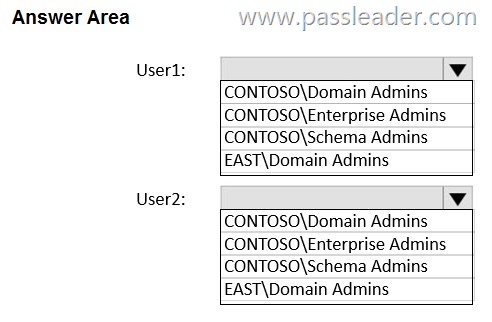
Answer: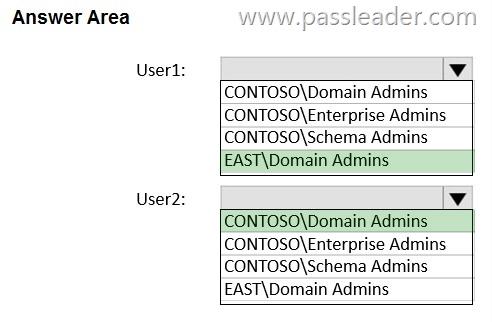
Explanation:
Box 1: EAST\DOMAIN Admins. User1 must deploy an additional domain controller to east.contoso.com. Domain admin in the east.comtoso.com (EAST) domain.
Box 2: CONTOSO\Domain Admins. User2 must deploy a new domain controller that will host a domain named west.contoso.com.
* CONTSOSO\Enterprise Admins – too powerful. Enterprise Admins is a member of the Administrators group in all domains in a forest.
* CONTSOSO\Schema Admins – type of admin.
* EAST\DOMAIN Admins – wrong domain.
https://www.ravenswoodtechnology.com/ad-roles-enterprise-admins-and-schema-admins
NEW QUESTION 310
HotSpot
Your on-premises network contains an Active Directory Domain Services (AD DS) domain named fabrikam.com. The domain contains a domain controller named DC1. DC1 has the DNS Server role installed and hosts the DNS primary zone for fabrikam.com. You have an Azure subscription that contains a virtual network named VNet1. VNet1 contains a virtual machine named VM1. The on-premises network is connected to Azure by using a Site-to-Site (S2S) VPN. From the Azure Command-Line interface (CLI), you run the following commands:
New-AzPrivateDnsZone -Name azure.fabrikam.com -ResourceGroupName RG1
New-AzPrivateDnsVirtualNetworkLink -ZoneName “azure.fabrikam.com” -ResourceGroupName “RG1” -Name “DNSlink” -VirtualNetworkId $VNET1.id
For each of the following statements, select Yes if the statement is true. Otherwise, select No.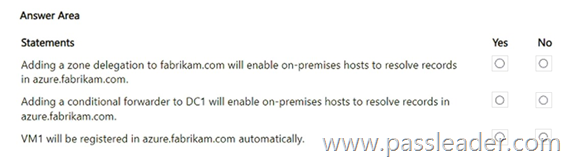
Answer: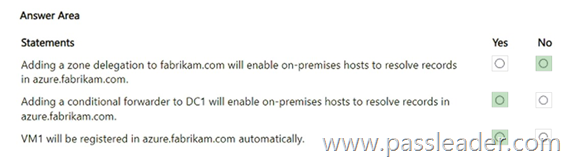
Explanation:
Box 1: No. A zone delegation to fabrikam.com is not the correct method; you need to configure conditional forwarding from your on-premises DNS server to the Azure DNS virtual network link to resolve records in azure. fabrikam.com. A zone delegation would delegate the entire fabrikam.com zone to Azure, which is not what you want.
Box 2: Yes. Conditional forwarding sends specific DNS queries to a different DNS server. On your on-premises DNS server, you will configure a conditional forwarder. You will specify that queries for the azure.fabrikam.com subdomain should be sent to the DNS servers in your Azure Virtual Network. In Azure, you will need to ensure the virtual network is configured to use the on-premises DNS servers for its DNS resolution. This allows your on-premises DNS server to continue resolving records for on-premises.fabrikam.com while forwarding only the specific azure.fabrikam.com queries to Azure. This way, on-premises hosts can resolve both on-premises and Azure resources by querying only their local DNS server.
Box 3: Yes. A virtual machine in the Azure virtual network can be automatically registered in the fabrikam.com domain, but it depends on the proper DNS configuration. For this to work, the Azure virtual network must be configured to use the on-premises DNS servers for name resolution, which is a common setup for a hybrid environment where Azure resources need to join the existing domain.
https://learn.microsoft.com/en-us/azure/architecture/example-scenario/identity/adds-extend-domain
NEW QUESTION 311
Drag and Drop
You have an on-premises server that runs Windows Server and contains a file share named Share1. You have an Azure subscription that contains an Azure Files share named azshare1 and an Azure File Sync instance named Sync1. Sync1 syncs Share1 with azshare1. You need to delete Sync1. Which four resources should you delete in sequence? (To answer, move the appropriate resources from the list of resources to the answer area and arrange them in the correct order.)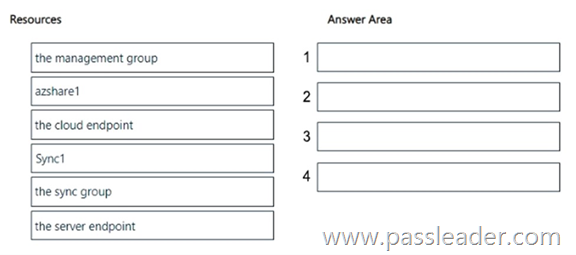
Answer: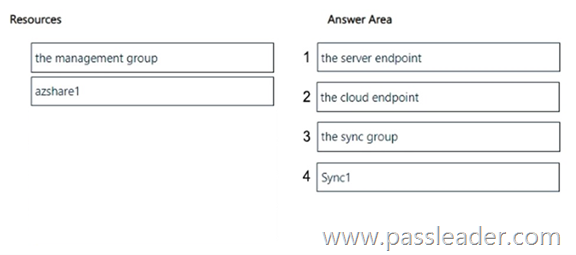
Explanation:
https://learn.microsoft.com/en-us/azure/storage/file-sync/file-sync-server-endpoint-delete
NEW QUESTION 312
Drag and Drop
You deploy a Windows Server container host. You need to create a container image that will be based on the Nano Server base image and will contain a custom file. Which four commands should you run in sequence? (To answer, move the appropriate commands from the list of commands to the answer area and arrange them in the correct order.)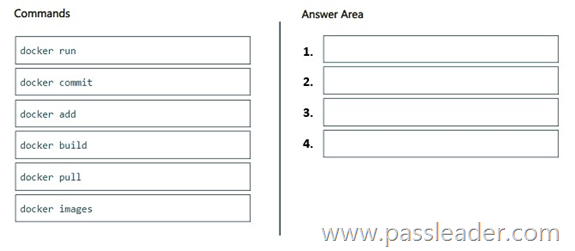
Answer: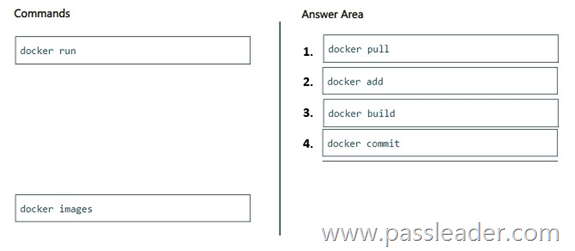
Explanation:
Step 1: docker pull. Pull the Nano Server base image.
Step 2: docker add. Add the custom file. The ADD command is used to copy files/directories into a Docker image.
Step 3: docker build. Build the image. Docker build creates the image by referring to a script.
Step 4: docker commit. Docker commit preserves an existing container into container image.
https://circleci.com/docs/guides/execution-managed/custom-images/
NEW QUESTION 313
……
Get the newest PassLeader AZ-800 VCE dumps here: https://www.passleader.com/az-800.html (321 Q&As Dumps)
And, DOWNLOAD the newest PassLeader AZ-800 PDF dumps from Cloud Storage for free: https://drive.google.com/drive/folders/1M49n7YTUDLf9THbqgk-Azy64eaC-kuhK