Valid AZ-801 Dumps shared by PassLeader for Helping Passing AZ-801 Exam! PassLeader now offer the newest AZ-801 VCE dumps and AZ-801 PDF dumps, the PassLeader AZ-801 exam questions have been updated and ANSWERS have been corrected, get the newest PassLeader AZ-801 dumps with VCE and PDF here: https://www.passleader.com/az-801.html (326 Q&As Dumps)
BTW, DOWNLOAD part of PassLeader AZ-801 dumps from Cloud Storage: https://drive.google.com/drive/folders/1skQpg3JBZ11LWigmgheS4CD4InHV2IrT
NEW QUESTION 291
You have an Azure subscription. The subscription contains two virtual machines named VM1 and VM2 that run Windows Server. VM1 experiences a stop error and fails to start. You need to review the memory dump file of the error. What should you do first?
A. On VM2, run Azure Serial Console.
B. Attach the OS disk of VM1 to VM2.
C. On VM1, run Azure Serial Console.
D. For VM1, enable boot diagnostics.
Answer: A
Explanation:
https://learn.microsoft.com/en-us/troubleshoot/azure/virtual-machines/windows/windows-stop-error-hardware-malfunction
NEW QUESTION 292
You have an Azure subscription. The subscription contains 100 virtual machines that run Windows Server 2025. You plan to implement data collection rules (DCRs) in Azure Monitor to collect Application logs and System logs from the virtual machines. You need to filter the events collected based on custom criteria. Which query language should you use?
A. LINQ
B. KQL
C. XPath
D. WQL
Answer: B
Explanation:
Transformations are KQL queries included in a DCR that run against each record received. They allow you to modify incoming data before it’s stored in Azure Monitor or sent to another destination. You may filter unneeded data to reduce your ingestion costs, remove sensitive data that shouldn’t be persisted in the Log Analytics workspace, or format data to ensure that it matches the schema of its destination. Transformations also enable advanced scenarios such as sending data to multiple destinations or enriching data with additional information.
https://learn.microsoft.com/en-us/azure/azure-monitor/data-collection/data-collection-rule-overview
NEW QUESTION 293
You have an Azure subscription. The subscription contains a virtual machine named VM1 that runs Windows Server. You enable Microsoft Defender for Servers Plan 2. You need to implement File Integrity Monitoring (FIM). What should you create first?
A. a Log Analytics workspace
B. a private endpoint
C. a storage account
D. a data collection rule (DCR)
Answer: A
Explanation:
To implement File Integrity Monitoring (FIM) for a Windows Server Azure VM with Microsoft Defender for Servers Plan 2, enable Defender for Servers Plan 2, then navigate to Defender for Cloud –> Environment settings –> relevant subscription, toggle File Integrity Monitoring to “On” and select Edit configuration to choose a Log Analytics workspace or create a new Workspace. Next, configure recommended and custom rules under the FIM settings by enabling them and selecting the desired change types for files and registries.
https://learn.microsoft.com/en-us/azure/defender-for-cloud/file-integrity-monitoring-enable-defender-endpoint
NEW QUESTION 294
You have an Azure virtual machine named VM1 that runs Windows Server. VM1 fails to start properly. You need to review the serial log to identify the issue. What should you use from the VM1 blade in the Azure portal?
A. Diagnose and solve problems.
B. Boot diagnostics.
C. Change tracking.
D. Performance diagnostics.
E. Resource health.
Answer: B
Explanation:
An Azure Virtual Machine “Server serial log” refers to the kernel messages and boot status information collected by Boot Diagnostics, which provides a snapshot of the VM’s state during boot-up. It includes kernel messages and periodic screenshots to help troubleshoot issues when a VM is inaccessible over the network or through standard remote connections. Accessing these logs is possible via the Azure Serial Console, a text-based interface that connects to the VM’s COM1 port, enabling administrators to perform emergency actions and troubleshoot problems without network connectivity.
https://learn.microsoft.com/en-us/troubleshoot/azure/virtual-machines/windows/serial-console-overview
NEW QUESTION 295
Your on-premises datacenter contains a server named Server1 that runs Windows Server. You install the System Insights feature on Server1. You discover that some of the System Insights capabilities are NOT installed. Which two capabilities should be installed manually on Server1? (Each correct answer presents part of the solution. Choose two.)
A. CPU capacity forecasting.
B. Physical disk anomaly detection (IOPS).
C. Networking capacity forecasting.
D. Physical disk anomaly detection (Latency).
E. Total storage consumption forecasting.
Answer: B
Explanation:
A System Insights capability is a machine learning or statistics model that analyzes system data to give you more insight into your deployment. System Insights includes a set of default capabilities, and you can add new capabilities dynamically without updating the operating system. The four default capabilities available are:
1. CPU capacity forecasting – Forecasts CPU usage. [Not A]
2. Networking capacity forecasting – Forecasts network usage for each network adapter. [Not C]
3. Total storage consumption forecasting – Forecasts total storage consumption across all local drives. [Not E]
4. Volume consumption forecasting – Forecasts storage consumption for each volume.
You install the System Insights feature itself, and then add new machine learning-based capabilities dynamically as needed without requiring an operating system update. This allows you to extend the functionality beyond the default capabilities, which include CPU capacity forecasting, Networking capacity forecasting, Total storage consumption forecasting, and Volume consumption forecasting.
https://learn.microsoft.com/en-us/windows-server/manage/system-insights/understanding-capabilities
NEW QUESTION 296
You have an Azure subscription that uses Azure Monitor. You need to create an alert rule that will generate an alert when an Azure virtual machine is turned off. Which type of signal should you use?
A. Activity log.
B. Service health.
C. Log.
Answer: A
Explanation:
An Azure Monitor Activity Log alert rule can be used to trigger an alert when an Azure virtual machine is turned off, by using the “Deallocate Virtual Machine” event. You would configure the alert rule to monitor events within a specific subscription and then set the signal to “Activity Log”, filtering for the desired operation name to detect when the VM is turned off.
https://learn.microsoft.com/en-us/azure/azure-monitor/alerts/alerts-overview
NEW QUESTION 297
Your network contains an Active Directory Domain Services (AD DS) domain named contoso.com. Contoso.com contains a member server named server1.contoso.com. You cannot resolve the FQDN of server1.contoso.com. You verify that Windows Defender Firewall is configured correctly and that you can ping server1.contoso.com successfully by using the server’s IP address. You need to validate that the DNS record for server1.contoso.com exists. Which command should you run?
A. tracert
B. ipconfig
C. pathping
D. nslookup
Answer: D
Explanation:
The most efficient way to check DNS records of the domain is to use a terminal with the command nslookup. This command will run on almost all operating systems (Windows, Linux, and macOS). The command nslookup shows all DNS records of the domain and below will be provided various nslookup command for the different DNS record types to check using the command line.
https://www.hostens.com/knowledgebase/how-to-check-dns-records-of-a-domain/
NEW QUESTION 298
You have an on-premises Hyper-V host named Server1. Server1 contains a virtual machine named VM1. You have a non-domain joined Hyper-V server named Server2 that is hosted in a remote location. You plan to replicate VM1 to Server2 by using Hyper-V Replica. You need to configure replication on Server1. Which authentication method can you use?
A. NTLM
B. Kerberos
C. preshared secret
D. certificate
Answer: D
Explanation:
For replicating a virtual machine from an on-premises Hyper-V host to a non-domain-joined host, you must use certificate-based authentication. This is because domain-based authentication like Kerberos is not possible without a domain. You will need to configure both hosts to use HTTPS for the replication protocol, which requires setting up SSL certificates to secure the connection.
https://learn.microsoft.com/en-us/windows-server/virtualization/hyper-v/manage/remotely-manage-hyper-v-hosts
NEW QUESTION 299
You have a server that runs Windows Server and hosts an app named App1. You need to prevent App1 from accessing external SMTP servers. The solution must meet the following requirements:
– Minimize the impact on App1’s access to external HTTP servers.
– Minimize the impact on other apps on the server.
– Minimize administrative effort.
What should you implement in Windows Defender Firewall?
A. an outbound program rule
B. an inbound custom rule
C. an outbound custom rule
D. an inbound program rule
E. an outbound port rule
Answer: E
Explanation:
An outbound port rule can be used to prevent an app from accessing external SMTP servers, but creating a more specific rule that targets the app itself is the most secure and recommended method. By creating an outbound rule to block SMTP ports (like TCP port 25) for the specific application, you can prevent it from sending email while still allowing other outbound connections. Alternatively, the most secure approach is to create an application-specific rule that blocks the app from connecting to specific remote ports, like 25, or block all outbound traffic by default and only allow necessary connections through application-specific rules.
https://learn.microsoft.com/en-us/windows/security/operating-system-security/network-security/windows-firewall/rules
NEW QUESTION 300
You have two on-premises Hyper-V hosts named Server1 and Server2. Server1 contains two virtual machines named VM1 and VM2. Server2 contains three virtual machines named VM21, VM22, and VM23. You have an Azure subscription. You plan to use Azure Site Recovery to replicate all the virtual machines to Azure. You need to deploy the Microsoft Azure Site Recovery Provider to the on-premises infrastructure. What is the minimum number of providers you should install?
A. 1
B. 2
C. 5
D. 7
Answer: B
Explanation:
You need two Azure Site Recovery Providers (or agents), one for each Hyper-V host, to implement Azure Site Recovery. The provider is installed on each standalone host or cluster node to orchestrate the replication of virtual machines to Azure.
– Installation requirement: The Azure Site Recovery Provider must be installed on each Hyper-V host that you want to replicate VMs from.
– Provider function: The provider communicates with the Azure Site Recovery service to manage replication over the internet.
– Agent function: The Recovery Services agent, which is installed alongside the provider, handles the actual data replication.
– Target VMs: No specific installation is needed on the virtual machines that are being replicated.
https://learn.microsoft.com/en-us/azure/site-recovery/hyper-v-azure-architecture
NEW QUESTION 301
You have an Active Directory Domain Services (AD DS) forest that has the Active Directory Recycle Bin enabled. The forest contains a user named User1. User1 is accidentally deleted. You need to restore User1 from the Active Directory Recycle Bin. What should you use?
A. Active Directory Sites and Services
B. Active Directory Domains and Trusts
C. Active Directory Administrative Center
D. Active Directory Users and Computers
Answer: C
Explanation:
To restore a deleted user in an Active Directory with the recycle bin enabled, open the Active Directory Administrative Center (ADAC), navigate to Deleted Objects, select the user, and click Restore to return it to its original location or Restore To … to choose a new location. Alternatively, you can use the Restore-ADObject PowerShell cmdlet.
https://learn.microsoft.com/en-us/windows-server/identity/ad-ds/get-started/adac/active-directory-recycle-bin
NEW QUESTION 302
You have a server that runs Windows Server 2025 Standard and has the Hyper-V role installed. You need to upgrade the server to Windows Server 2025 Datacenter. The solution must minimize downtime. What should you run?
A. dism.exe
B. setup.exe
C. slmgc.vbs
D. convert.exe
Answer: A
Explanation:
DISM, which stands for Deployment Image Servicing and Management, is a command-line tool for managing and servicing Windows images. It can be used to install, uninstall, and update Windows features, drivers, and packages, and to repair corrupted system files on both offline and running Windows operating systems. You can use the dism.exe command to upgrade Windows Server 2025 Standard to Datacenter edition with minimal downtime by running the command to set the new edition. However, this is for the operating system edition, not for the Hyper-V role itself, which is installed as a feature.
https://learn.microsoft.com/en-us/windows-hardware/manufacture/desktop/what-is-dism
NEW QUESTION 303
Your on-premises network contains an Active Directory Domain Services (AD DS) domain. The domain contains a file Server named Server1 that hosts multiple shared folders. You have an Azure subscription. You need to migrate the files stored on Server1 to Azure by using an Azure Data Box gateway. To which storage services can you migrate the files?
A. Azure Files only.
B. Azure Files and Azure Storage page blobs only.
C. Azure Files and Azure Storage block blobs only.
D. Azure Files, Azure Storage page blobs, and Azure Storage block blobs.
Answer: D
Explanation:
All three types of files – Azure Files, Azure Storage page blobs, and Azure Storage block blobs – can be copied from an on-premises Active Directory Domain Services (AD DS) domain file server to an Azure Data Box gateway.
1. Azure Files: This is designed for structured data like files and folders, making it suitable for copying data from an on-premises file server. It can even leverage Active Directory authentication for seamless integration with existing domain environments.
2. Azure Storage page blobs: While primarily optimized for random access to large data sets like databases or virtual machine disks, page blobs can also be used for general file storage. They are particularly useful when you need to access parts of a file frequently.
3. Azure Storage block blobs: This is the most flexible option for storing unstructured data like text, images, and videos. Block blobs can be stored in containers, similar to directories on a file system, and offer various upload methods.
https://learn.microsoft.com/en-us/azure/databox-gateway/data-box-gateway-overview
NEW QUESTION 304
You have an Azure subscription. Your on-premises network connects to Azure by using an Azure VPN gateway named VPN1. You need to monitor the Azure gateway health probe for VPN1. Which TCP port should you use?
A. 443
B. 1723
C. 3389
D. 8081
E. 65500
Answer: D
Explanation:
The Azure VPN gateway uses port 8081 for health probes to check its health status. For active-active gateways, an additional port, 8083, is used to check the second public IP address.
– Port 8081: The standard port for health probes on an Azure VPN gateway. You can access the health probe by navigating to https://<YourVirtualNetworkGatewayIP>:8081/healthprobe.
– Port 8083: Used for active-active gateways to check the health of the second public IP address. The URL for this probe is https://<YourVirtualNetworkGatewayIP2>:8083/healthprobe.
https://learn.microsoft.com/en-us/answers/questions/1313000/disable-port-7999-8081-for-azure-vpn-gateway
NEW QUESTION 305
You have an Azure subscription. The subscription contains a Log Analytics workspace named Workspace1 and 100 virtual machines that run Windows Server. You enable Microsoft Defender for Servers Plan 2 and configure Defender for Servers to monitor for Windows file and registry changes on the virtual machines. You need to query the detected file and registry changes. Which table should you query?
A. ASimFileEventLogs
B. MDCDetectionFimEvents
C. ASimRegistryEventLogs
D. DeviceRegistryEvents
Answer: D
Explanation:
To find file and registry changes in Microsoft Defender for Servers, query the DeviceRegistryEvents and DeviceFileEvents tables in the Microsoft 365 Defender portal or Microsoft Sentinel (if integrated). These tables contain telemetry data collected by the Defender for Endpoint sensor, which captures detailed information on registry modifications and file system activities.
– DeviceRegistryEvents: Use this table to find information on registry changes. You can filter by registry keys, values, and event types (e.g., creation, deletion, modification).
– DeviceFileEvents: Use this table to find information on file and folder changes. This includes actions like creation, deletion, modification, and renaming of files.
https://learn.microsoft.com/en-us/defender-xdr/advanced-hunting-deviceregistryevents-table
NEW QUESTION 306
You have an Azure subscription. The subscription contains a virtual machine named Server1 that runs Windows Server. You create a new Log Analytics workspace named Workspace1. You need to collect performance metrics for Server1 by using Azure Monitor. What should you do next?
A. Regenerate the secondary key.
B. Install the Azure Connected Machine agent.
C. Create a data collection rule (DCR).
D. Deploy and configure Windows Event Forwarding.
Answer: B
Explanation:
To monitor a Windows Server VM with Azure Monitor, you need the Azure Monitor agent installed on the VM, a Data Collection Rule (DCR) to specify what data to collect, and a Log Analytics workspace to store the data. You can often enable the necessary agents and a basic DCR automatically by activating VM insights for the virtual machine.
https://learn.microsoft.com/en-us/azure/azure-monitor/agents/azure-monitor-agent-overview
NEW QUESTION 307
HotSpot
You have a server named Server1 that runs Windows Server. You need to capture the SYN packets exchanged between Server1 and an IP address of 192.168.0.100. How should you complete the command? (To answer, select the appropriate options in the answer area.)
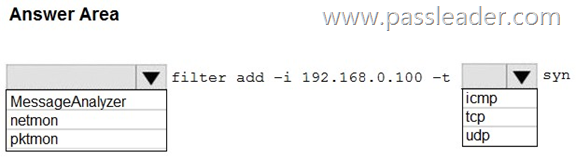
Answer:
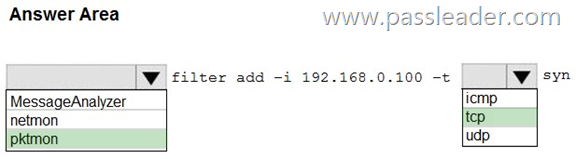
Explanation:
https://learn.microsoft.com/en-us/windows-server/administration/windows-commands/pktmon-filter-add
NEW QUESTION 308
HotSpot
Your network contains an Active Directory Domain Services (AD DS) domain. You plan to protect high-privilege domain credentials by specifying the following:
– The lifetime of the Kerberos Ticket Granting Ticket (TGT).
– The conditions required for devices to request a TGT.
What should you use, and what should you create? (To answer, select the appropriate options in the answer area.)
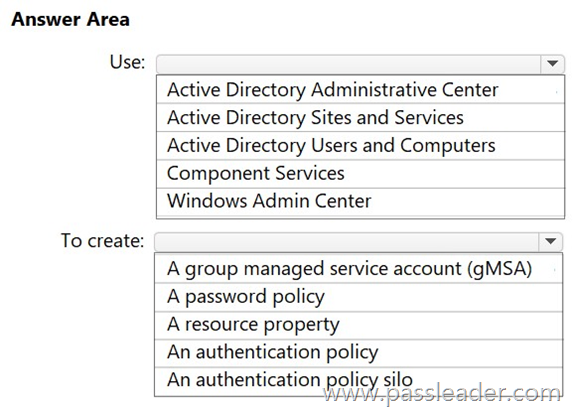
Answer:
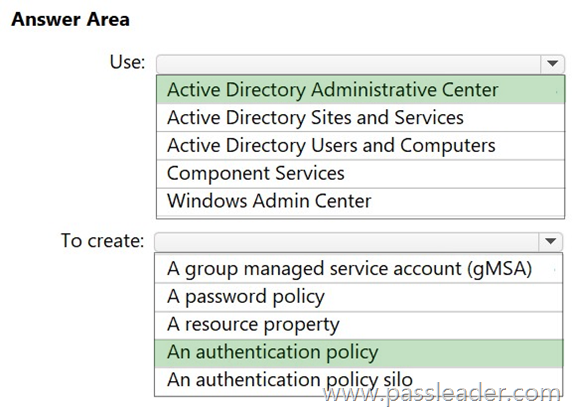
Explanation:
https://learn.microsoft.com/en-us/windows-server/identity/ad-ds/manage/how-to-configure-protected-accounts
NEW QUESTION 309
HotSpot
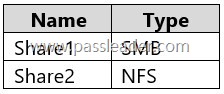
You have an on-premises server named Server1 that runs Windows Server and contains the shares shown in the following table:
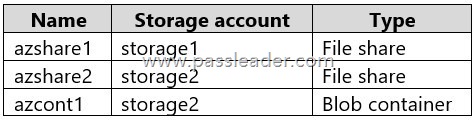
You have an Azure subscription named Sub1 that contains an Azure Storage Mover resource named Mover1 and the storage accounts shown in the following table:

The storage accounts contain the resources shown in the following table:
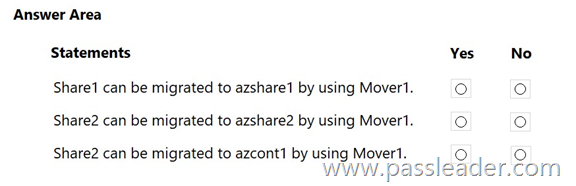
For each of the following statements, select Yes if the statement is true. Otherwise, select No.
Answer:
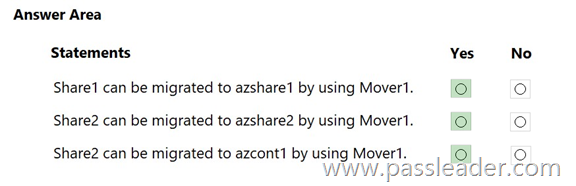
Explanation:
Box 1: Yes. Share1 is a SMB share. Azshare1 is a File share in a Premium FileStorage account. An SMB source, and an (SMB) file share as target is supported.
Box 2: Yes. Share2 is an NFS share. Azshare2 is a File share in a standard StorageV2 account. An Azure Storage Mover can move an on-premises NFS share to a standard StorageV2 account’s file share, as Azure Storage Mover supports migrating from NFS sources to Azure Files targets.
Box 3: Yes. An NFS shares can be moved to a Blob container with Hierarhcical namespace enabled.
https://learn.microsoft.com/en-us/azure/storage/files/migrate-files-storage-mover
NEW QUESTION 310
Drag and Drop
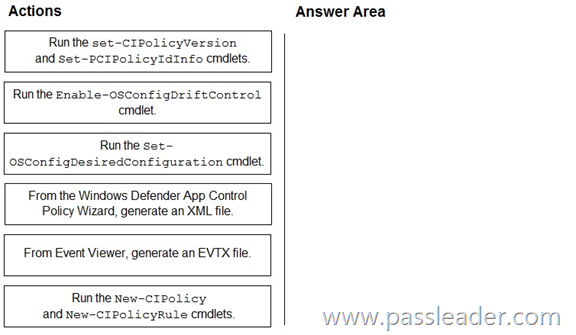
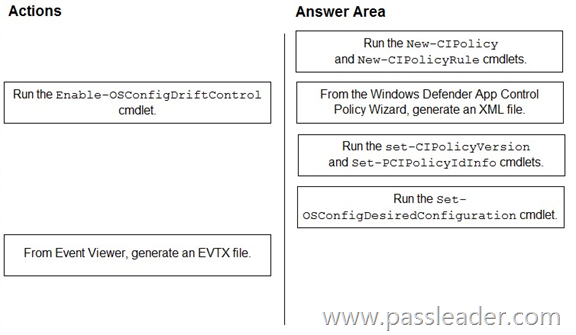
You have a server named Server1 that runs Windows Server. For Server1, you enable the default App Control for Business policies in audit mode. You need to ensure that specific third-party applications installed on Server1 are allowed to run by using App Control for Business. Which four actions should you perform in sequence? (To answer, move the appropriate actions from the list of actions to the answer area and arrange them in the correct order.)
Answer:
Explanation:
https://learn.microsoft.com/en-us/windows/security/application-security/application-control/app-control-for-business/design/select-types-of-rules-to-create
https://learn.microsoft.com/en-us/windows/security/application-security/application-control/app-control-for-business/design/plan-appcontrol-management
https://learn.microsoft.com/en-us/windows-server/security/osconfig/osconfig-how-to-configure-app-control-for-business
NEW QUESTION 311
Drag and Drop
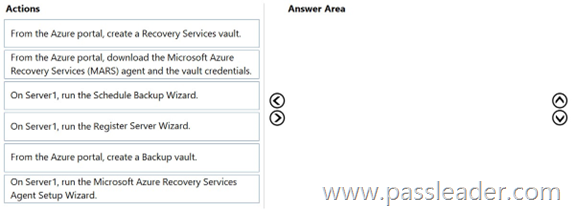
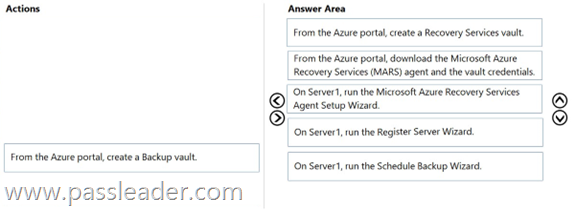
You have an on-premises server named Server1 that runs Windows Server. You need to perform an on-demand backup of the files on Server1 by using Azure Backup. Which five actions should you perform in sequence? (To answer, move the appropriate actions from the list of actions to the answer area and arrange them in the correct order.)
Answer:
Explanation:
https://learn.microsoft.com/en-us/azure/backup/tutorial-backup-windows-server-to-azure
NEW QUESTION 312
Drag and Drop
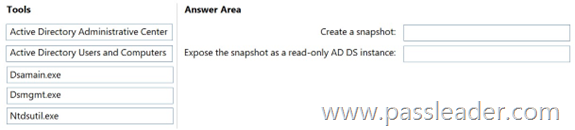
Your network contains an Active Directory Domain Services (AD DS) domain named contoso.com. You need to perform the following tasks:
– Create a snapshot of contoso.com.
– Expose the snapshot as a read-only AD DS instance.
What should you use for each task? (To answer, drag the appropriate tools to the correct tasks. Each tool may be used once, more than once, or not at all. You may need to drag the split bar between panes or scroll to view content.)
Answer:
Explanation:
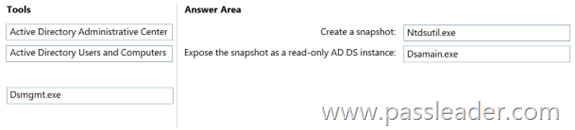
Box 1: Ntdsutil.exe. To create an AD DS snapshot, open an elevated Command Prompt, launch ntdsutil, and use the snapshot command to create a snapshot of the domain. The process involves running ntdsutil, activating the NTDS instance, creating the snapshot, and then using ntdsutil again to mount the snapshot to a different port so you can use a tool like dsamain to access the data without rebooting.
Box 2: dsamain.exe. To expose an Active Directory snapshot as a read-only instance, use the dsamain.exe command-line tool with the mount and activate instance parameters. First, use dsamain -list all to find the snapshot’s GUID, then use dsamain -mount <GUID> to mount it, and finally, use dsamain -activate instance <GUID> to set it as the active instance for queries. This allows you to view the snapshot’s data via an LDAP server without making any changes, note that this process does not create a new read-only domain controller.
https://learn.microsoft.com/en-us/windows-server/identity/ad-ds/manage/forest-recovery-guide/ad-forest-recovery-determine-how-to-recover
https://learn.microsoft.com/en-us/previous-versions/windows/it-pro/windows-server-2012-r2-and-2012/cc772168(v=ws.11)
NEW QUESTION 313
……
Get the newest PassLeader AZ-801 VCE dumps here: https://www.passleader.com/az-801.html (326 Q&As Dumps)
And, DOWNLOAD the newest PassLeader AZ-801 PDF dumps from Cloud Storage for free: https://drive.google.com/drive/folders/1skQpg3JBZ11LWigmgheS4CD4InHV2IrT